
Vertical anchors in surveys refer to the responses or options listed vertically in a survey question. They are used to provide a clear and consistent reference point for respondents to use while answering survey questions.
Navigating to the Survey screen
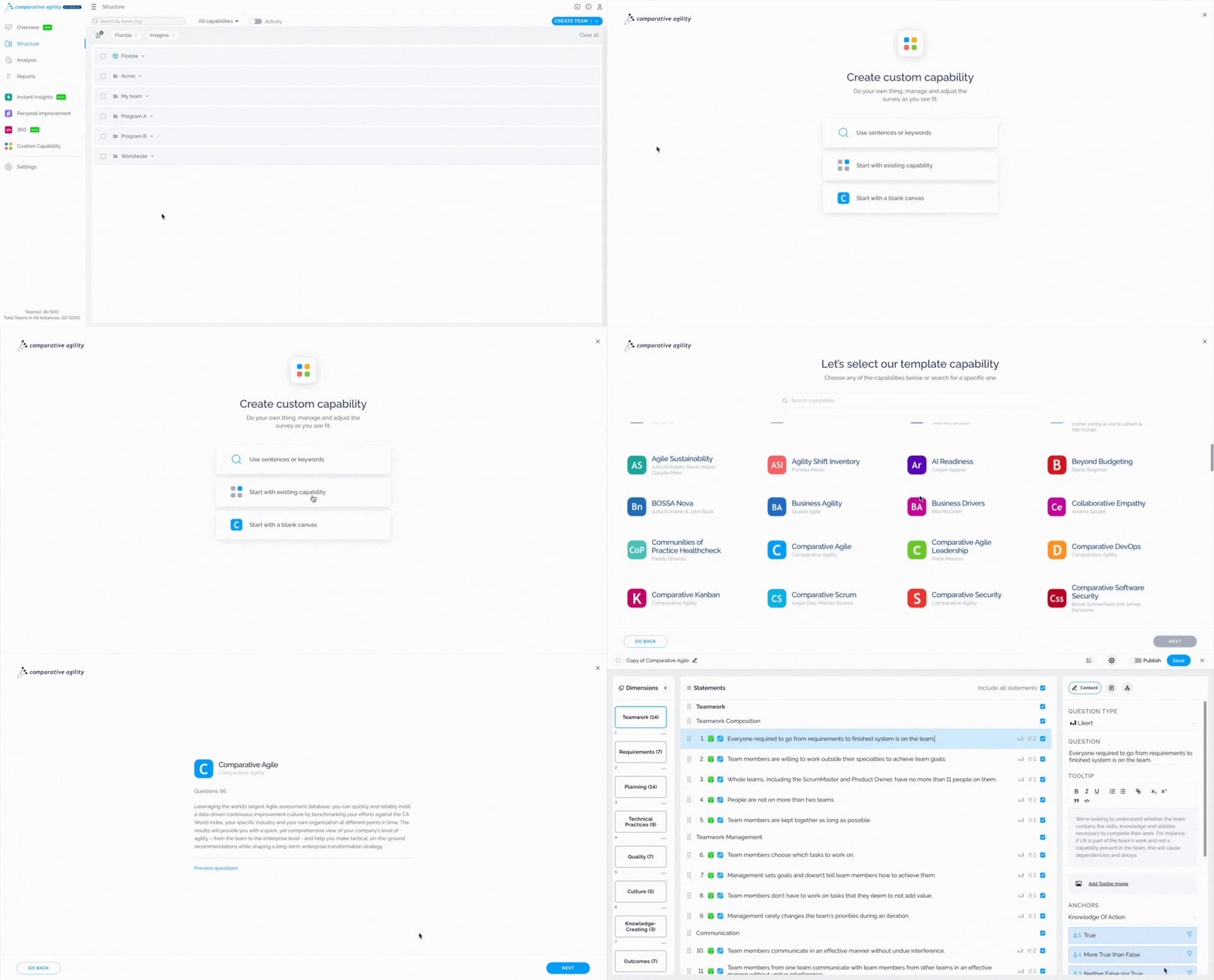
- First, click on Custom Capability
- Choose between the existing capability or a blank canvas
The short video below shows you how to navigate to the Survey screen
Enabling Vertical anchors
Once you open a survey, navigate to the General Settings, scroll down to the Anchors section, and select custom anchors. Check the box next to Vertical Anchors, populate custom anchors, and save the changes.
In the short video below we show you how to enable Vertical anchors

Note: You can enable vertical anchors for individual statements.
Adding tooltips to Vertical Anchors
With a new update that we released, now you have the option of adding tooltips to Vertical Anchors. To do that, click on the edit button called Add a tooltip next to the custom anchors, type in your tooltip, and click on Done.
Note: Adding tooltips is optional.
The screenshot below shows you where to add tooltips

If you ever need any assistance or have any questions please reach out to our support team at support@comparativeagility.com and we will be more than happy to assist you.